
Snapshots (saved sign-ins)
A snapshot is a named, described copy of a browser's sign-in for chosen sites: its cookies for those sites, plus the site storage (localStorage and sessionStorage) of the page that was open when it was saved. A browser that loads a snapshot starts signed in, so your agent, or a sub-agent, does not have to sign in again.
Snapshots are not page snapshots. browser_snapshot reads the text of the open page; a snapshot saves a sign-in. The tool texts say so too, so small models do not mix them up.
| Tool | What it does |
|---|---|
snapshot_list | Lists the saved snapshots: name, description, sites, cookie counts, version and where each one is loaded. Never cookie names or values |
snapshot_save | Saves this browser's sign-in: creates a new snapshot, refreshes the one loaded in this browser, or (with replace: true) overwrites one after you signed in again by hand |
snapshot_describe | Changes a snapshot's description, and nothing else |
snapshot_load | Loads a snapshot into this browser: its saved cookies replace the browser's cookies for those sites, and its site storage is restored on every page load |
snapshot_delete | Deletes a snapshot for good. Only when your user asks for it |
agent_run with snapshot | Starts a sub-agent whose private browser is already signed in, and refreshes the snapshot from it when the run succeeds |
save_sign_in (a sub-agent tool) | Lets a sub-agent save a sign-in it made during its job, so the next job starts signed in |
The five snapshot_* tools are the snapshots group. The default TOOLSETS=all includes it; with a custom list, add snapshots. They work without a model. Only agent_run and save_sign_in need the sub-agents; without them (no model, or TOOLSETS without agents), the server instructions and the snapshot tools' results point only to snapshot_load.
How it works
your browser (main): you sign in, then
snapshot_save {"name": "amazon", "description": "Amazon — personal account (Prime)"}
        │
        ▼
SNAPSHOTS_DIR   amazon.json    description, sites, counts (no secrets)
                amazon.state   cookies and site storage (encrypted with SNAPSHOTS_KEY)
        │
        ├──▶ snapshot_load {"name": "amazon"}
        │      your browser is signed in
        │
        └──▶ agent_run {"snapshot": "amazon", …}
               the sub-agent's private browser starts signed in;
               a successful run saves the renewed sign-in back
Every browser keeps its own cookies, so a snapshot moves a sign-in between browsers only when an agent asks for it. Loading a snapshot into your own browser never reaches sub-agents, and a sub-agent's browser starts empty unless the host passes snapshot to agent_run.
Choosing a snapshot
The host agent calls snapshot_list and picks a snapshot by its description:
2 snapshot(s) (saved sign-ins):
- amazon — Amazon — personal account (Prime) · 14 cookies for amazon.com (1 expired) · storage for 1 site · v3, updated 2 h ago by sub-agent run r4c1d2e9 · loaded in: this browser (active)
- shop-work — Example Shop — work account · 6 cookies for shop.example.com · v1, updated 5 days ago by lmstudio-mcp-server-session 1.0.0

Pick one by its description: snapshot_load {"name": "<name>"} signs your browser in; agent_run {"snapshot": "<name>", …} starts a sub-agent signed in.
With a single snapshot that can be loaded, the hint names it instead (Use it: snapshot_load {"name": "amazon"} …), so a small model never copies the name of another account. The agent_run part appears only when the server offers agent_run (a model is configured and TOOLSETS includes the agents).
The description is what tells two snapshots of the same site apart, so keep it current: when your user says the amazon snapshot is really the family account, the host calls snapshot_describe {"name": "amazon", "description": "Amazon — family account"}. A description holds up to 500 characters. Never put a password or a code into it: descriptions are logged, shown on the dashboard, and shown to sub-agents.
structuredContent has the same list: every snapshot's allowlisted metadata (name, description, version, domains, cookie_count, cookie_domains, expired_count, next_expiry, origins with item counts, loaded_in, …), loaded_here (the snapshots loaded in the calling browser) and active_here (the one it loaded or saved last).
Saving a sign-in
Create a snapshot
Sign in to the site in your browser, with your user's help: they give the host the password or a code to type. Values typed into password and one-time-code fields are masked in the logs (LOG_REDACT_SECRETS). Then, with a page of that site open:
{ "name": "amazon", "description": "Amazon — personal account (Prime)" }Created snapshot "amazon" (v1, "Amazon — personal account (Prime)"): 14 cookies for amazon.com, and the site storage of https://www.amazon.com. It is loaded in this browser. To start a sub-agent signed in, call agent_run with {"snapshot": "amazon"}.- The name is trimmed and lowercased, spaces become
-, and it must then be 1 to 64 lowercase letters, digits,-or_, starting with a letter or digit (Amazon Workbecomesamazon-work). Results always show the stored name. - A new snapshot needs a description: which site and which account, for example
Amazon — personal account (Prime). domainschooses the sites. Left out, it is the site of the active tab (its host withoutwww.). See Domain filters.- Site storage is saved only when the open page has
localStorageorsessionStorageitems; otherwise the result names no site storage. - A name that is already taken is never overwritten by accident: saving under it refreshes or replaces that snapshot, as described below.
- The closing
agent_runsentence appears only when the server offersagent_run.
Refresh the snapshot loaded in this browser
Sites renew their sign-in cookies. To save the current ones, call snapshot_save with the name of a snapshot that is loaded in this browser. It keeps the snapshot's sites, saves this browser's cookies for them as a new version (v2, v3, …), and merges the site storage of the open page into the storage saved before (an open page of those sites whose storage is now empty removes its saved entry). description is optional here and replaces the old one; domains is ignored. A refresh is refused when this browser lost sign-in cookies the snapshot holds (below).
Replace a snapshot after signing in again
A refresh is refused when the snapshot is not loaded in this browser, or when another browser saved a newer version after this one loaded it:
Snapshot "amazon" changed after this browser loaded it: sub-agent run r4c1d2e9 saved v4 after this browser loaded v3. If you signed in by hand to the account this snapshot is for, call again with replace: true to overwrite it; otherwise load it first with snapshot_load, or save under a new name.This keeps one browser from overwriting a sign-in that another one just renewed. When the saved sign-in has expired and you signed in again by hand to the same account, overwrite it:
{ "name": "amazon", "replace": true }replace keeps the snapshot's sites unless you pass domains, and saves only the site storage of the open page.
Another account of the same site
A browser holds one sign-in per site. To save a second account of a site whose snapshot is loaded in this browser:
browser_clear_cookies. It deletes every cookie and unloads the snapshots loaded in this browser, so their site storage is no longer written into its pages:Cleared all cookies (14 removed). Snapshot "amazon" is no longer loaded in this browser.- Sign in to the other account.
snapshot_save {"name": "amazon-work", "description": "Amazon — work account"}.
Without step 1, the save is refused (see below), because the page's site storage would still come from the loaded snapshot.
What every save refuses
- No sign-in cookies.
This browser has no sign-in cookies for amazon.com; snapshot not changed.Nothing is saved when the browser has no unexpired cookies for the snapshot's sites. - A signed-out browser (refresh).
This browser lost 1 of the sign-in cookies saved in snapshot "amazon" (signed out?); snapshot not changed.A refresh is refused when a cookie saved in the snapshot that has not expired and isHttpOnlyor a session cookie (one without an expiry) is missing from the browser (same name, domain and path): a page or the site may have signed the browser out.snapshot_saveadds what to do: if this browser is signed in to the account the snapshot is for, save withreplace: true; otherwise load it again withsnapshot_load. The check goes by cookie names, so it cannot tell when the site replaced such a cookie with one of the same name for a signed-out visitor or another account. - A deleted snapshot. An update never creates: if the snapshot was deleted meanwhile, the save fails.
- Mixing accounts. A snapshot saved with
domains: ["*"]takes every cookie of the browser. Saving into it is refused while another snapshot is loaded in the same browser, because that snapshot's sign-in would end up in it. Any save is also refused when the open page's site storage is written by another loaded snapshot:Snapshot "amazon" is loaded in this browser and writes its saved site storage into https://www.amazon.com on every page load, so that storage would be saved into "amazon-work"; no snapshot was saved.The result adds: clear the cookies first (browser_clear_cookies, which also unloads"amazon"), sign in again, then save. - Too much. A snapshot holds at most 5 MB of cookies and storage, and the server keeps at most 500 snapshots. The limit error asks the agent to ask you which snapshot to delete; agents never delete one on their own.
Saving (create, refresh or replace) unloads the other snapshots loaded in this browser whose sites overlap the saved one's (below), because this browser's cookies for those sites now belong to the new version: Snapshot "amazon" is no longer loaded in this browser: this browser's cookies for its sites are now saved as "amazon-work".
Loading a snapshot into your browser
{ "name": "amazon" }Loaded snapshot "amazon" (v3, "Amazon — personal account (Prime)") into this browser: restored 13 of 14 cookies for amazon.com (skipped 1 expired cookies for amazon.com).
Site storage of https://www.amazon.com is restored on every page load.
Open the site (browser_navigate): this browser should be signed in. Other sites' sign-ins in this browser were not changed.snapshot_load:
- Deletes this browser's own cookies for the snapshot's sites (every cookie, for a
["*"]snapshot), so two accounts never mix. - Unloads the other snapshots loaded in this browser whose sites overlap this one's, because their cookies were just replaced (see below).
- Sets the saved cookies. Expired ones are skipped and reported by domain and count, never by name. An expiry more than 400 days ahead is set to 400 days from now, as browsers cap it (saving caps it the same way), so cookies that "never expire" (
Expires=31 Dec 9999) are restored too. - Restores the saved site storage on every page load of its origins, and on the open page at once if it is on one of them.
- Marks the snapshot as loaded (and active) in this browser at that version, which is what a later refresh checks.
Snapshots for unrelated sites can be loaded in one browser at the same time. The last one loaded or saved is the browser's active snapshot. Cookies of other sites stay as they are.
Snapshots whose sites overlap replace each other: the same site, a site and its subdomain or parent domain, two subdomains of one parent domain (they share its cookies), or a ["*"] snapshot and any other. Loading or saving one unloads the others in this browser: their loaded marker and their site storage go (the cookies the new one did not replace stay). The result names them, for example Snapshot "amazon-work" is no longer loaded in this browser: this load replaced its cookies., and structuredContent.unloaded lists them. This keeps one account from being saved into another account's snapshot: a plain snapshot_save of an unloaded snapshot is refused (is not loaded in this browser) until you load it again or pass replace: true.
A ["*"] snapshot replaces every cookie of the browser, and its result says so instead of saying that other sites were not changed: This snapshot covers every site (domains ["*"]): all of this browser's cookies were replaced by the saved ones, so other sign-ins in this browser are gone.
When OBSCURA_STORAGE_DIR is set, the main engine also keeps the loaded cookies in its own cookie store, and the tool result says so.
If the engine restarts (a page crashed it), the browser loses its cookies. The next tool result in the main browser says The snapshot "amazon" loaded in this browser was lost; load it again with snapshot_load.
Sub-agents and snapshots
agent_run takes three parameters for signed-in jobs:
| Parameter | Default | Meaning |
|---|---|---|
snapshot | — | Name of a snapshot to start the agent's private browser with. An unknown name returns an error that lists the saved names, before anything starts |
update_snapshot | true | When the run completes successfully, save the agent's renewed sign-in back into the snapshot |
allow_evaluate | false | Runs started with a snapshot get no browser_evaluate (page scripts could read the signed-in cookies and storage) unless this is true |
What happens during the run:
- At the start the server loads the snapshot into the new browser (the dashboard shows
loading snapshot amazon). If it cannot, because the snapshot was deleted orSNAPSHOTS_KEYchanged afteragent_runwas called, the run fails with that reason. - The agent is told in its task message which saved sign-in it has: the name, the description (as quoted data) and the cookie domains. It is told to check whether it is signed in before signing in, never to read, copy, output or send cookie or storage values, and to stay on those sites and the sites the TASK names while signed in.
- If the isolated engine restarts during the run, the server loads the snapshot into the new connection before the agent continues, and tells the agent
The browser was reset; your saved sign-in "amazon" was re-applied; open the page again.When your user deleted the snapshot during the run, nothing is re-applied: the agent gets the usual notice that its pages were reset, and is never signed in to a newer snapshot saved under the same name. - At the end, when the run completed with
success: trueandupdate_snapshotis notfalse, the server saves the agent's cookies back into the snapshot. The result saysSaved sign-in "amazon" was refreshed from the agent's browser (v4).This saves whatever account the agent's browser is signed in to at the end, without the agent callingsave_sign_in: passupdate_snapshot: falsefor jobs that open pages you do not trust. The refresh is skipped, and the result says why (Saved sign-in "amazon" was not refreshed: <reason>.), when:- another browser saved a newer version meanwhile;
- your user deleted the snapshot during the run;
- the browser was reset and the snapshot could not be loaded into it again, or the engine was still down at the end (after a reset that re-applied the snapshot, the refresh runs as usual);
- the agent's browser had no sign-in cookies for the site at the end;
- the agent's browser lost sign-in cookies saved in the snapshot, for example because a page signed it out:
the agent's browser lost 1 saved sign-in cookie (signed out?).
structuredContent has snapshot: {name, version} and snapshot_saved: {name, version, action, reason?}. A snapshot the run saved or refreshed and your user then deleted, before the run ended, is reported as skipped with the reason the user deleted it during the run, never as one to use.
agent_automate and agent_find do not take snapshots. Automation scripts replay in fresh, empty browsers.
save_sign_in: a sub-agent saves its sign-in
When the snapshots tools are enabled (TOOLSETS) and AGENT_SNAPSHOT_SAVE is on (the default), agent_run agents also get save_sign_in {name?, description?}. The agent calls it after it signed in during the job, for example with a one-time code the host gave it, and only to the account the TASK or the host named:
- If the run started with a snapshot (and
update_snapshotis on), it refreshes that snapshot. The agent cannot change its description. - Otherwise it creates a new snapshot for the site of the open page, with the name and description the agent gives. A job creates at most one snapshot, and a taken name is refused.
- It never saves a snapshot your user deleted during the run:
The user deleted snapshot "amazon"; do not save it again. - It is refused, like
snapshot_save, when the browser lost the saved sign-in cookies of the snapshot it refreshes, or when its open page's storage comes from another loaded snapshot. The agent gets the reason asError: <message>.
The run's result reports a new snapshot: The agent saved its sign-in as snapshot "example-shop" (v1): pass {"snapshot": "example-shop"} to agent_run to start a later job signed in. Set AGENT_SNAPSHOT_SAVE=false to keep sub-agents from saving sign-ins at all.
Example: an order, end to end
Your user asks the host agent: "Order a 2 m USB-C cable on Amazon, under $15, and tell me the order number."
1. Find or make the sign-in. The host calls snapshot_list. There is no Amazon snapshot yet, so it opens https://www.amazon.com in its own browser and signs in with your user's help, then saves it:
{ "name": "amazon", "description": "Amazon — personal account (Prime)" }2. Hand over the job. The host starts a sub-agent that is signed in from the start:
{
  "task": "On https://www.amazon.com, find a USB-C to USB-C cable, 2 m, under $15 with Prime delivery, and order it to the default address with the default payment method.",
  "output": "The order number, the item, the total and the delivery date.",
  "snapshot": "amazon"
}
3. The agent asks before it orders. It searches, picks a cable, and goes to the checkout. The TASK says what to buy, but it is not an approval of this checkout: before it presses Place your order, the agent asks the host (reason confirm), and agent_run returns at once. Had it skipped the question, the server would have refused the click (Orders and payments).
Run r5b8e21f is waiting for your answer (question q3c9a01, asked on https://www.amazon.com):

Place the order for "USB-C to USB-C cable, 2 m, 100 W" at $11.99, total $12.87 with tax, delivery Thursday to the default address in Berlin, paid with the saved Visa card?

Options: Yes, place the order | No

This asks you to approve a step that cannot be undone. Ask your user to approve it, then answer with agent_reply. If your user already approved exactly this earlier in your conversation, approve it yourself.

The run is paused and keeps its browser. Answer with agent_reply {"run_id": "r5b8e21f", "question_id": "q3c9a01", "answer": "..."}
Answer it now, or ask your user and answer when they reply (the run waits up to 30 min, then continues without an answer; agent_cancel stops it). Never approve a purchase your user did not approve, and never send a code on your own.
asked on is the page the agent's browser had open, read by the server, not text the model wrote.
4. The host relays it. Your user has not approved this order yet (the job came without a purchase_approval), so the host asks them (a chat host ends its turn to do that; the run waits). They say yes, and the host answers:
{ "run_id": "r5b8e21f", "question_id": "q3c9a01", "answer": "Yes, place the order." }5. The run finishes. The agent places the order, reads the confirmation and calls finish. agent_reply waits for that and returns:
Answer delivered to run r5b8e21f (question q3c9a01).
Agent run r5b8e21f (agentic) completed — success. 14 steps, 2 min 41 s.

OUTPUT:
Order 112-4455667-8899001: USB-C to USB-C cable, 2 m, 100 W; total $12.87; arriving Thursday.

Questions the agent asked you (paused 48 s in total):
- q3c9a01 (confirm, answered): Place the order for "USB-C to USB-C cable, 2 m, 100 W" at $11.99, total $12.87 with tax, delivery Thursday to the default address in Berlin, paid with the saved Visa card? → "Yes, place the order."

Saved sign-in "amazon" was refreshed from the agent's browser (v2).
Had your user said no, the host would answer "No, do not place the order." and the agent would finish without ordering.
Variations:
- Approved ahead of time. If your user already said "go ahead if it is under $15", the host passes their words with the job:
"purchase_approval": "Approved: 1 cable, total at most $15, to the default address". The agent still asks at the checkout, and the question shows the approval. The checkout matches it ($12.87 for one cable), so the host answers"Yes, place the order."at once, without asking your user again. Had the total been $18, the host would ask your user first. Writing the approval into the TASK alone skips nothing: the server keeps the order button blocked until the host answers a question. - A one-time code. When the saved sign-in is old, the site may send a code to your user's phone. The agent asks with reason
sign_in; a question that asks for a code is secret by default, so the reply arguments include"secret": true. The host tells your user which site asks, and relays only the code ("482913", not a sentence). The code is masked in logs, transcripts, results and on the dashboard, the agent types it, and the refresh at the end keeps the renewed sign-in. - No snapshot at all. Without
snapshot, the agent starts signed out. It never types a password the TASK did not give it, so it finishes withsuccess: falseand says which site needs a sign-in. The host then signs in in its own browser, saves a snapshot, and starts the job again with it.
Everything about questions and answers is in Sub-agents.
Domain filters
A snapshot's domains decide which cookies it saves and replaces, and which site storage it keeps:
"amazon.com"covers cookies foramazon.comand all its subdomains (www.amazon.com,smile.amazon.com).- It also covers cookies of parent domains that a browser would send to that site: a filter
"www.example.com"keeps the cookies set forexample.com, which are often the session cookies. A bare top-level domain such ascomnever matches. - Site storage is matched the same way, by the page's host.
- Entries are normalized:
https://www.example.com/loginbecomeswww.example.com, and letters are lowercased. ["*"]means every cookie of the browser. It is never the default: pass it explicitly. Loading such a snapshot first deletes every cookie of the browser.- Restored cookies apply to the site's subdomains too. Obscura does not report whether a cookie was host-only (set without a
Domainattribute), so a cookie thatexample.comset for itself alone is restored as a cookie forexample.comand all its subdomains. Keep this in mind for sites whose subdomains serve content from other people.
Sites that sign in across several domains need all of them, for example ["example.com", "example-login.com"]. The default, the site of the open page, fits most sites.
Limits of Obscura's storage
- Cookies are the reliable part. All of the browser's cookies for the chosen sites are saved, including
HttpOnlyones and session cookies without an expiry. Expired cookies are skipped when a snapshot is loaded, andsnapshot_listand the dashboard count them. Expiries more than 400 days ahead are saved and restored as 400 days from now. The site may still have ended a session on its side, or ask again when it sees a new device or address. - Site storage is saved for the open page only. In Obscura v0.2.2,
localStorageandsessionStoragedo not survive a navigation or a reload, and the browser can only read the storage of the page that is open. A save captures the storage of the active tab's origin (when it is one of the snapshot's sites), and a refresh merges it with the storage saved before for other origins. - Storage is restored on every page load. A loaded snapshot registers a small script that writes the saved values into each new page of its origins, so pages find them after every navigation. The values go straight to the browser and are never logged.
- Not saved: IndexedDB, Cache Storage and service workers.
- Engine restarts lose the browser's cookies. The main browser must load the snapshot again; a sub-agent's browser gets it back by itself.
Where snapshots are stored
SNAPSHOTS_DIR holds two files per snapshot:
| File | Contents |
|---|---|
<name>.json | Metadata, no secrets: description, version, who saved it and when, the domain filter, cookie count, cookie domains, cookie expiry times, storage origins with item counts, how often it was loaded |
<name>.state | The cookies and site storage: a live sign-in. Encrypted when SNAPSHOTS_KEY is set |
- In Docker, the folder is
/data/snapshotson thesnapshotsnamed volume, which survives rebuilds and restarts. Running the server without Docker, it is./data/snapshots(gitignored). See Configuration. - The folder is created owner-only (mode 0700) and the files 0600. Writes go through a temporary file that is then renamed, and symbolic links are refused.
SNAPSHOTS_DIRmust not be insideLOG_DIR(log folders are shared and downloadable) or beSCRIPTS_DIR: the server refuses to start.- If the folder is not writable, the server logs an error at startup with a hint (
sudo chown -R 1000:1000on a host folder) and keeps running; only the snapshot tools fail. - A state file without valid metadata, left by a crash or a hand edit, is listed as
incomplete. It cannot be loaded, and is never removed automatically: delete it when your user agrees.
To see the files:
docker compose exec stealth-web-search ls -l /data/snapshotsEncryption at rest
Set SNAPSHOTS_KEY in .env to any secret string, and run docker compose up -d:
SNAPSHOTS_KEY=a-long-random-string-only-this-server-knows- State files are then encrypted with AES-256-GCM. The key for each file is derived from
SNAPSHOTS_KEYwith scrypt and a random salt, and the snapshot's name is bound to the encrypted data, so a file renamed to another snapshot does not decrypt. Metadata files stay readable; they hold no secrets. - Snapshots saved before the key was set are encrypted at the next start. The log lists how many and which.
- A changed or missing key makes the older snapshots unreadable: loading one fails with
cannot decrypt snapshot "amazon": SNAPSHOTS_KEY is missing or differs from the one used to save it. Sign in again and save withreplace: true, or delete them when your user agrees. - The key is never logged. The startup line says
configuredornone,config:checksayssetornone, and the dashboard's Snapshots tab says whether snapshots are encrypted and counts the ones that are not.
Encryption protects copies of the volume, such as backups. It does not protect against someone who can read both .env and the volume.
Deleting snapshots
Agents delete a snapshot only when your user explicitly asks for it: never to clean up, rename or make room. The server instructions and the tool description say so, and no error message suggests deleting one.
Delete with snapshot_delete {"name": "amazon"}, or on the dashboard. Deleting:
- removes both files for good;
- removes its site storage from every browser that loaded it, and its loaded markers;
- stops running jobs from saving it again:
save_sign_inrefuses, and the end-of-run refresh is skipped. A job that already saved or refreshed it reports it as not saved (the user deleted it during the run); - stops a running agent's browser from getting it back after an engine restart, even when a new snapshot is saved under the same name.
Cookies the snapshot already put into a browser stay there until they are cleared (browser_clear_cookies) or the browser closes. Sub-agent browsers are discarded when their run ends. With OBSCURA_STORAGE_DIR, the main engine keeps those cookies in its own store until they are cleared.
The Snapshots tab
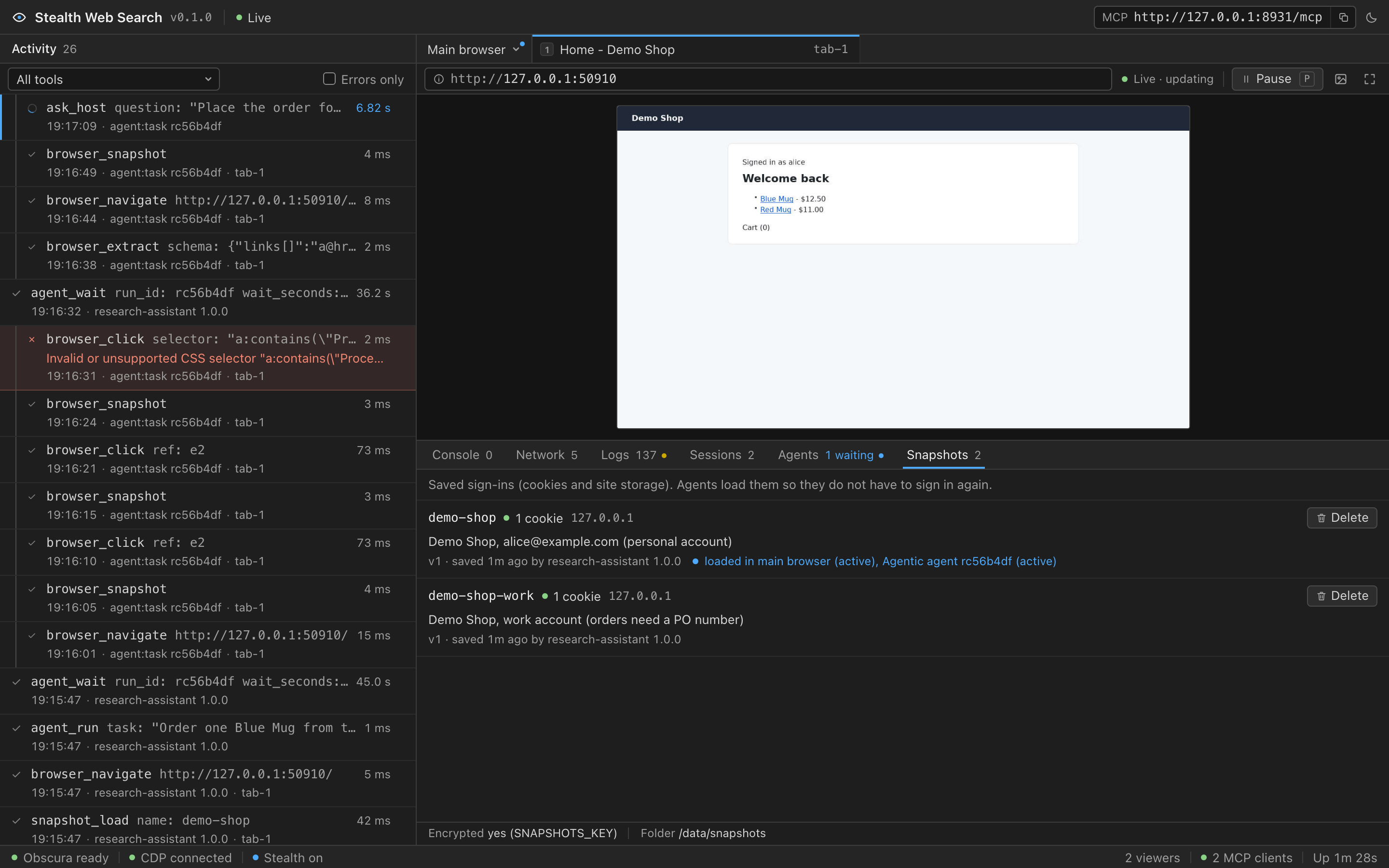
The dashboard (http://127.0.0.1:8931/) has a Snapshots tab next to Agents. It lists every snapshot with its name, description, cookie count (marked when some cookies expired or the entry is incomplete), cookie domains, where it is loaded (the main browser or a sub-agent run), and its version with who updated it and when. The footer shows the folder, whether snapshots are encrypted, and a warning for snapshots saved without encryption. The list updates live, and a cookie count turns to N expired or all expired when a saved cookie expires while the tab is open.
Delete asks for confirmation in the row, and says when a running sub-agent uses the snapshot. Escape cancels. Screen readers announce the confirmation's warning with the red Delete button, and an error once. A held Enter or Space counts as one press, so one long press opens the confirmation or confirms it, never both, and never deletes more than one snapshot. After a delete, the keyboard focus moves to the neighbouring row itself (Tab reaches its Delete button), or to the Snapshots tab when no row is left.
The tab uses two API routes:
| Route | What it does |
|---|---|
GET /api/snapshots | The metadata of every snapshot, where each one is loaded, the folder and the encryption state. Never cookie names or values |
DELETE /api/snapshots/<name> | Deletes a snapshot. The dashboard's only request that changes anything |
The delete route refuses a request (HTTP 403) unless it carries the header X-SBM-Request: 1 and an Origin header naming this server, and, when the browser sends Sec-Fetch-Site, that header is same-origin or none. The Origin names this server when its host and port are those of the Host header or of PUBLIC_URL, or when its host is a name in ALLOWED_HOSTS: a name without a port there matches on any port (a proxy on :8443 works), and one with a port only on that port. localhost, 127.0.0.1 and the other built-in names must match the Host header, port included. Another website open in your browser therefore cannot delete snapshots. With AUTH_TOKEN set, the token is needed too. From a script:
curl -s -X DELETE http://127.0.0.1:8931/api/snapshots/amazon \
  -H 'X-SBM-Request: 1' -H 'Origin: http://127.0.0.1:8931'
Security notes
- A snapshot is a live sign-in. Anyone who can read its state file, and the key if one is set, can act as that account. Keep the
snapshotsvolume private, setSNAPSHOTS_KEY, and never share the folder. - Whoever can reach the server can use every snapshot. Any MCP client can load a snapshot into the main browser or start a sub-agent with it. Set
AUTH_TOKENif anyone else can reach port 8931. - A signed-in sub-agent, and every page it opens, can act as that account. Obscura v0.2.2 sends cookies on cross-site requests (it does not enforce
SameSite), so a page the agent visits can make requests to the signed-in site with its cookies. Pass a snapshot only for jobs on that site, and keep the TASK specific. The agent is told to stay on the snapshot's sites and the sites the TASK names, and it gets nobrowser_evaluateunless you passallow_evaluate: true. - The browsers stay isolated otherwise. A sub-agent's browser starts empty unless the host passes
snapshottoagent_run, and what you load into your own browser never reaches sub-agents. - Values never reach the logs. The browser commands that read and write snapshot cookies and storage are never logged, whatever
LOG_REDACT_SECRETSsays, and tool results, the dashboard and transcripts carry names, domains and counts only. Descriptions are logged and shown: keep secrets out of them. - Sub-agents save sign-ins through
save_sign_inand the end-of-run refresh. A page could try to get an agent to sign in to an account the page controls.save_sign_intells the agent to save only after signing in to the account the TASK or the host named, andAGENT_SNAPSHOT_SAVE=falseturns it off. The end-of-run refresh of a job started with a snapshot needs no decision of the agent: it saves whatever account the browser holds at the end. It is skipped when the browser lost the saved sign-in cookies (signed out), but a page that signs the browser in to another account under the same cookie names would be saved. Passupdate_snapshot: falsefor jobs that open pages you do not trust. - Restored cookies reach subdomains. Obscura does not report host-only cookies, so a restored cookie is also sent to the site's subdomains (Domain filters).
More in SECURITY.md and Troubleshooting.